Weeds Season 3 - 1 MU Links
Posted by gotthatpiff
Your New Creative Partner
ACID Pro 7 software is a DAW powerhouse that combines full multitrack recording and mixing, MIDI sequencing, and legendary ACID looping functionality for a seamless music-creation and post-production environment. More creative partner than production tool, ACID Pro 7 software inspires you like nothing else. With its Transparent Technology design, ACID Pro 7 software removes typical barriers to the creative workflow so you can effortlessly transform ideas into real results.
Posted by gotthatpiff
MP4 to MP3 Converter for Windows is picked video to audio converter, MP3 converter software, which will assist your PC in implementing your command to convert your favorites such as convert MP4 to MP3, RM to MP3, MPEG to MP3, convert M4A to MP3, AAC to MP3, and most files to MP3 file simply and swiftly.
MP4 to MP3 Converter for Windows, a comprehensive converting MP4 to MP3 tool rumored as all-inclusive video to audio converter software, which lies on it can convert MPEG1, MPEG2, MPEG4, WMV, AVI, 3GPP, 3G2, MOV, RM, RMVB, OGG, DV, H.264, MP4 files to MP3 audio formats supported by any generation music MP3 player, portable media or MP4 player, and latest Young-Stars i.e. Zune, iPod shuffle, iPod nano, iriver PMP-100, Creative Zen Vision etc.
MP4 to MP3 Converter for Windows designed by MP4Coverter Software Studio will synchronize your audio music world with the giddy video space. Free download MP4 to MP3 Converter for Windows to make music MP3 players dance around you with your favorite music.
Key Features
High Conversion Speed
Offer multithreading and batch conversion;
Fully support Intel® Pentium D Dual-Core Processor and AMD Athlon™ 64 X 2 Dual-Core Processor;
Supply >200% conversion speed, beyond your imagination.
Plentiful Control Functions
Convert MP4 to MP3, convert M4A to MP3, AAC to MP3 converter;
MP4 to MP3 converter supports multithreading and batch conversion;
Copy ID3 tag between audio formats (reserve ID3 tag during converting);
When converting to MP3, bitrate, VBR or CBR, stereo or mono are selectable;
You can select the compression method, sample rate, bitrate, stereo or mono to convert to MP3;
System Requirement and Installation Process
Limitation of System Configuration
Windows 2000/XP/Vista or better
Posted by gotthatpiff
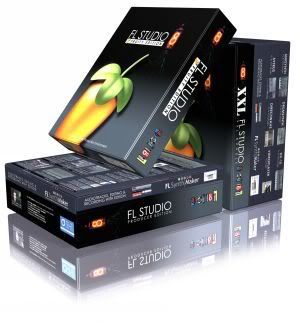
Image Line has released FL Studio 8, a complete music production environment.
Representing the culmination of more than 10 years of sustained development, FL Studio 8 is set to become the most flexible virtual music studio tool in the industry.
Chief Software Architect, Didier Dambrin has realized his vision of creating an open-architecture virtual studio environment where the only constraint on the users is their own imagination. This philosophy is reflected in FL Studio 8’s flexible audio and control data routing, free-form Playlist design and interoperability with industry standards (VST/VSTi/VST2, DXi, DXi2, Buzz, ReWire, MIDI, MP3, WAV, OGG). Didier notes ”We don't try to protect our data & come up with new formats only for marketing reasons. We use existing standards as much as possible, and allow FL Studio to be used as a plugin in other hosts“. In version 8, particular emphasis has been given to improved workflow through enhanced interface design, so that ideas can be crystallized and creativity captured.
What is FL8?
FL Studio is a fully featured, open-architecture music creation and production environment for PC. No extra software is required* to produce any style of music, as the complete set of instrument and studio tools is included in the cost of the package. With the included plugins, sounds and tools the user can create complete songs, as well as backing tracks, loops and sizzling beats. Completed songs can be saved to WAV, MP3 or MIDI or .ZIP or native project formats (.FLP).
Posted by gotthatpiff
Cool Edit Pro Overview:
Cool Edit Pro is a power-packed digital
All of the functions required for taking an audio project from conception to completion are included in Cool Edit Pro. This means you don?t need third-party applications or ?plug-ins? to get the job done. However, plug-in support is built-in so you can use any DirectX-compatible audio plug-in as easily as Cool Edit Pro?s native effects.
Cool Edit Pro allows you to record and mix up to 128 stereo tracks using any Windows-compatible
After you've recorded your tracks, take advantage of Cool Edit Pro's set of powerful enhancing tools. Add natural-sounding reverb. Process your sound files dynamic range to give it more oomph.
Adjust the timbre of the recording for just the right combination of highs and lows. Perform smooth-as-silk fades. Clean-up poor-sounding audio by removing clicks, pops, hum, and hiss. Stack your tracks on top of one another and arrange them with drag-and-drop ease.
When it comes time to mix your creation, you'll appreciate Cool Edit Pro's separate level, pan, mute, solo, and routing controls. It's like having a high-priced mixing console inside your PC without the high price!
Save your work in a variety of audio formats from industry-standard .wav, .au, and .aif files, to popular compressed formats like .mp3, mp3PRO, and wma.
Need to work with
Most of all, Cool Edit Pro is just plain fun to use. Whether you?re using the program for the first time or are a long-time Cool Edit Pro 1.x user, we bet you won't be using Cool Edit Pro too long before the word cool comes out of your mouth.
A Partial List of Cool Edit Pro's Features:
Multitrack editing and mixing up to 128 tracks!
Unmatched wave editing power
More than 40 DSP effects, mastering and analysis tools, and audio restoration features including Echo, Reverb, Flanging, Chorusing, Compression, Limiting, Equalization,
Real-Time effects and equalization that can be non-destructively applied to any track
The ability to organize tracks into busses
Support for more than a dozen distinct file formats (not including sub-formats) including MIDI and video files
Built-in CD ripping
Friendly, customizable interface, complete with dockable windows and customizable shortcut hotkeys? for most functions
Powerful loop-based song creation, including session tempo and key matching.
Noise, Tone, and DTMF Tone generation
32-bit sample resolution support and full 32-bit internal processing with support for 24-bit/192 kHz and higher
Scripting and Batch-Processing
Phrase recognition (auto cue generation)
Cue and Play List support for multiple files and for segments within files
Scientific filters, text export capability, and file-statistics gathering functions for data analysis
Waveform and
Multitrack SMPTE/MTC Master, MIDI and video support
The combination of Cool Edit Pro and any Windows sound card puts the power of a complete digital
Posted by gotthatpiff
Band-in-a-Box is so easy to use!
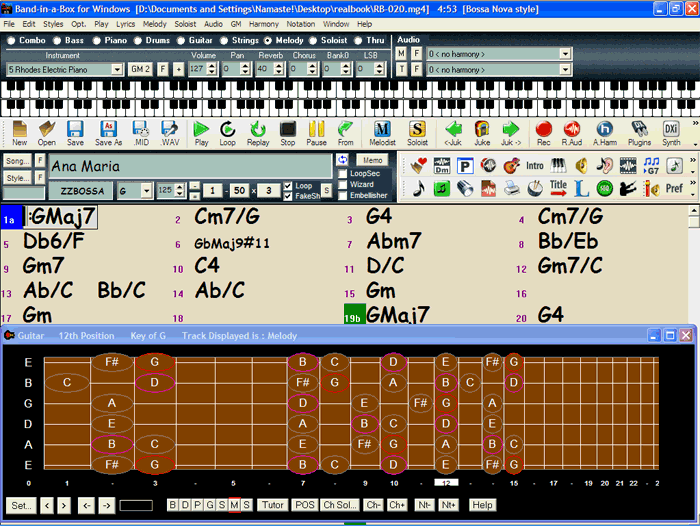
Just type in the chords for any song using standard chord symbols (like C, Fm7, or C13b9), choose the style you’d like, and Band-in-a-Box does the rest, automatically generating a complete professional-quality arrangement of piano, bass, drums, guitar, and strings or horns in a wide variety of popular styles. Live audio tracks can be created using RealDrums and RealTracks.
And that’s not all...
Band-in-a-Box is a powerful and creative music composition tool for exploring and developing musical ideas with near-instantaneous feedback. Over the years many features have been added to Band-in-a-Box – Notation and Lyrics, Piano Roll, 16-channel MIDI Multitracks, Harmonization, the StyleMaker and StylePicker, a live performance Conductor window, Medley Maker, and 24 –substyle Multistyles. The Soloist and the Melodist are popular “intelligent” features that generate professional solos or even create whole new songs from scratch. RealDrums adds the human element of a live drummer while RealTracks add even more live session musicians, bringing the entire Band-in-a-Box arrangement to life. The Audio Chord Wizard has the amazing ability to analyze, extract, and show the chords from audio recordings on-screen and then write them to the Band-in-a-Box chord sheet.
The inclusion of digital audio features makes Band-in-a-Box the perfect tool for creating, playing, and recording your music with MIDI, vocals, and acoustic instruments. Band-in-a-Box for Windows® can also record an acoustic instrument or voice to add to the composition, with processing through its own DirectX audio effects. Its built-in TC Helicon audio harmonies will turn your audio track into multiple harmony parts or adjust its pitch, with vibrato and scooping effects for realistic vocal styles and up to sixteen choral parts.
You can print out your finished creation with lyrics, chords, repeats and endings, DC markings and codas, or save it as a graphics file for web publication or to e-mail to a friend. And when you're ready to let others hear your composition, you can burn it directly to an audio CD. Or save your composition as a Windows Media File (or in any other compressed formats you have) for a file that’s “Internet ready.”
You’ll have even more fun making automatic medleys, playing your favorite song lists in the Band-in-a-Box Jukebox, and singing along to your Karaoke files with CDG graphics.
Posted by gotthatpiff
Auto-Tune is a multi-platform plug-in that corrects intonation problems in vocals or solo instruments, in real time, without distortion or artifacts, while preserving all of the expressive nuance of the original performance with audio quality so pristine that the only difference between what goes in and what comes out is the intonation. Over a typical pitch correction range, it is simply not possible to tell that a sound has been processed, except that it is perfectly in tune.
Posted by gotthatpiff
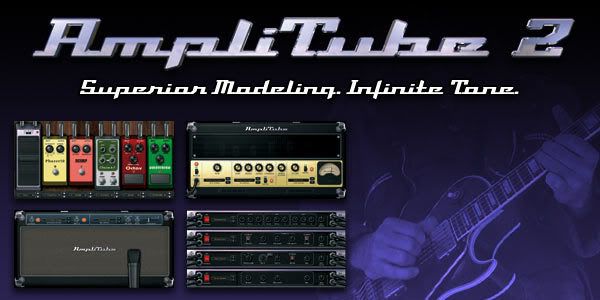
The most popular guitar amp and effects modeling software raises the standard to an unprecedented level of high-quality emulation and extreme flexibility, for crafting the ultimate guitar tone.
14 Preamp and 14 EQ models
7 Power-Amp models
16 Cabinet models
6 Microphone models
21 Stomp Effect models
11 Rack Effect models
High-precision Tuner
2 Guitar rig chains
Plug-In and Standalone version
Complete Guitar Amp modeling solution and Guitar Effects powerhouse.
AmpliTube 2 offers everything needed to craft your own signature guitar tones with 5 separate modules including Tuner, Stomp, Amp Head, Miked Cabinet, and Rack Effects, on 2 series/parallel guitar rigs. 14 Preamps and EQs, 7 Power
Posted by gotthatpiff
Adobe Audition is a multitrack recording studio that offers a flexible workflow and exceptional ease of use. Adobe Audition enables you to mix up to 128 tracks, edit individual audio files, create loops, and use more than 45 DSP effects. Whether you're producing music, radio broadcasts, or audio for video, the precise tools in Adobe Audition give you the power to create rich, nuanced audio of the highest possible quality.
Posted by gotthatpiff
Mixcraft™ is an affordable multi-track audio and
Add effect processing such as reverb, delay,
When you’ve finished your project, mix down your music to CD or MP3 directly in Mixcraft! Even with all this power, Acoustica engineers have kept the design easy-to-use and clean.
Mixcraft™ 4 Main Features :
• Clear, colorful, and intelligently designed interface to streamline your work.
• Custom loop library includes hundreds of royalty-free sounds in dozens of musical styles.
• Works with Acid™ and Apple Garage Band™ loops.
• Record multiple MIDI and audio tracks simultaneously.
• Piano roll to view and edit MIDI.
• Includes a General MIDI library, two sampled grand
• Includes 18 high quality effects.
• Create mega presets that layer and split multiple virtual synthesizers and effects.
• Add unlimited VSTi™ instruments, VST™ and DirectX™ effects.
• Mix down to MP3, WAV and other audio file types.
• Burn CDs of your mix with just one click.
http://rapidshare.com/files/259683430/Acoustica_Mixcraft__4.5__Build__118_.zip
Posted by gotthatpiff
n-Track Studio is a complete recording studio in your PC: all you need is a card and some free space on your hard disk to store audio data.
n-Track Studio supports simultaneous recording from multiple 16 and 24 bit soundcards, and real-time audio effects can be applied non-destructively to each track, allowing the user to listen immediately to the result of a change in the parameters of an effect: up to 25 combinations of effects per track are allowed. n-Track Studio is a multitrack recording and editing program.
Built-in effects include Reverb, AutoVol, Echo, Pitch Shift, Chorus and Track EQ. The program can use third party DirectX and VST plug-ins to process in real-time audio signals in a number of different ways.
Effect can also be used to process the recorded signal in real-time so that the computer can act as a multi-effects device.
n-Track Studio uses 24 bit (32 bit floats) resolution for mixing and effects processing. Various wave files formats are supported, mono & stereo tracks are can coexist in the same song and wave editing operations can be performed from within the program.
MIDI tracks can be imported end exported to regular MIDI files, and edited using the built in piano-roll based MIDI editing.
All the audio tracks are saved as standard wave files and mixed "on the fly" during playback. Volume and pan evolution can be programmed by drawing on the timeline window.
When all the tracks have been recorded and all the settings are correct, it's possible to mix-down all the tracks to a single wave file for recording it to a compact disk using a CD recorder or for distributing it through the Internet (using the built-in mp3 encoder).
Here are some key features of "n-Track Studio":
· Speed and transpose controls for whole song, tracks and individual tracks .wav files
· Support for skinning user interface. Skins dialog box lets easily change program appearance, including colors and graphic files used to draw the interface
· Scrubbing to audition parts of the song by dragging with the mouse in the scrub area below upper time axis
· Change speed with or without changing pitch
· Reverse playback of song and .wav files
· Waveforms can now be zoomed beyond 1 sample/1 pixel level
· Sample by sample manual editing at high zoom levels
· Allow directly specifing of musical key (instead of transpose /-) of Acidized loop .wav files
· Mono-stereo-left-right-expand to stereo channel mixer button
· Dockable channel properties window instead of modal popup dialog box
· Button on waveform to audition single .wav file
· Button on waveform to drag .wav file without having to switch into the 'drag wave files' mouse mode (Ctrl key)
· Tab control to switch between timeline and Piano-roll windows
Requirements:
· Pentium III 800 or better
· 256 Mb RAM
What's New in This Release:
Summary of changes from v6.0.4 to v6.0.5:
· More flexible routing: channels can have an arbitrary number of sends to any other channel [New Feature]
· Output channel label with popup menu in each mixer stripe [New Feature]
· Level Meter Ruler to set a custom reference RMS level [New Feature]
· Zoom toolbar buttons keep on zooming when button is held pressed [New Feature]
· More graceful handling of missing plugins in songs being loaded [New Feature]
· Pan mixer settings editable via keyboard [New Feature]
· Fixed dragging part and releasing mouse outside of timeline window leaves timeline scrolling until mouse is clicked again [Bug Fix]
· Signal Path window enhancements
Posted by gotthatpiff
Speed Gear, PC Speeder Tool, Speed Up Your Windows, Speed Up Your Feeling!
Speed Gear 5.0 - Our award-winning product, fantastic speeder tool to adjust
Speed Gear is a fantastic tool to speed up games. It can speed up almost all the games. Speed Gear is easy-to-use, you can press an easily accessible hotkey to speed up game, slow down game or adjust game to the speed you feel most comfortable with.
Speed Gear will give you brand new experience while playing games. For example; with this program you can slow down the action games so that you can see the bullet's flight line and avoid it easily.
Feature List:
* Adjust your Windows operation system speed.
* Give you brand new experience while playing games.
* All software will change the speed after you adjust the speed rating.
* Speed up Windows 9x, me,
* Our special "duo-speeder-engine", "time-redemption" and "linearity-accelerate" technology.
NOTE:THIS SOFTWARE IS ONLY XP COMPATIBLE.DONT TRY IT ON VISTA AS IT WILL NOT BE GOOD